Keybindings
Every rebindable stet shortcut, grouped by what it acts on. Press ? in the app for the same list.
The keyboard drives everything in stet. Press ? at any time to see this list
inside the app. Overlays (pickers, menus, the quit confirm) carry their own keys
in a hint row along their bottom edge, so those are not repeated here.
Navigation
| Key | Action | Rebind id |
|---|---|---|
j / k | move in the tree, viewer, or problems panel | focus-down, focus-up, cursor-down, cursor-up, problem-down, problem-up |
h / l | collapse / expand folders (tree) or hop the caret by word (viewer) | collapse, expand, caret-prev, caret-next |
tab | cycle focus through the open panes; the search pane's tab cycles its fields | switch-pane |
enter | open the focused item / jump to a problem | open, open-problem |
ctrl-p | go to file: fuzzy-search the whole repo | go-to-file |
. | jump to the most recently changed file | latest-file |
n | jump to the next file with findings | next-finding |
Viewer
| Key | Action | Rebind id |
|---|---|---|
/ | find in the viewer; n/N cycle matches, esc clears | find |
ctrl-f | project search pane; regex/case/scope/glob toggles | search |
v | toggle diff ↔ full file view for a changed file | toggle-view |
z | fold / unfold the region at the caret | fold |
x | toggle long-line wrap in the viewer | toggle-wrap |
a | toggle the line provenance rail | provenance |
f | load full content when truncated | load-full |
ctrl-d / u | half-page cursor movement in the viewer | half-page-down, half-page-up |
g / G | jump to first / last line | first-line, last-line |
F12 | go to definition of the symbol under the caret | go-to-definition |
Shift+F12 | find references to the symbol under the caret | find-references |
Shift+I | find implementations of the symbol under the caret | implementations |
Shift+H | call hierarchy of the symbol (Tab flips direction) | call-hierarchy |
K | hover: type and docs for the symbol under the caret | hover |
S | find symbols: outline of the open file | symbols |
< / > | back / forward through viewer history | back, forward |
y | copy path (tree), path:line:col (viewer), or the selected result / problem | copy-reference |
Y | copy the file (viewer) or every entry (problems) | copy-file |
Shift+↑ / ↓ | extend a line selection (drag also selects) | select-up, select-down |
C | copy the selected lines (or the caret line) | copy-selection |
Tabs
| Key | Action | Rebind id |
|---|---|---|
ctrl-t | pin / unpin the current file as a tab | pin-tab |
ctrl-w | close the active tab | close-tab |
{ / } | previous / next tab | prev-tab, next-tab |
Workspace
| Key | Action | Rebind id |
|---|---|---|
s | scope picker: kinds, or drill into recent commits | scope |
t | theme switcher: filter, live-preview, apply | theme |
w | switch to another git worktree | worktrees |
c | toggle changes-only filter for the tree | changes-only |
ctrl-s | save current settings to config | save-settings |
r | re-run diagnostics | run-checks |
R | restart language servers | restart-servers |
Layout
| Key | Action | Rebind id |
|---|---|---|
p | toggle the problems panel | problems |
ctrl-b | toggle the file tree sidebar | toggle-sidebar |
[ / ] / \ | shrink (closes past min) / grow / reset the focused problems panel, else the tree | shrink-pane, grow-pane, reset-pane |
d | dock the focused pane to the next edge, clockwise | move-pane |
m | toggle zooming the focused pane to fill the window | zoom-pane |
App
| Key | Action | Rebind id |
|---|---|---|
e | open in terminal editor (suspends TUI, --editor template) | open-editor |
o | open in GUI / IDE (renderer stays live, --ide template) | open-ide |
O | open externally in the OS default app (images, PDFs, binaries) | open-external |
Shift+F10 | context menu for the focused row or symbol (or right-click) | context-menu |
? | show all keybindings and the marks legend | help |
q | quit (confirm with y) | quit |
Custom keybindings
Every key above is rebindable through the keybindings section of your
configuration: map a rebind id from the tables
to a combo, a list of combos, or false to unbind it.
{
  "keybindings": {
    "toggle-sidebar": "ctrl+e", // one combo
    "cursor-down": ["j", "↓"], // several
    "provenance": false, // unbind
  },
}
A combo is optional ctrl/shift modifiers joined by + or -, then a key:
a letter, a symbol (?, [), an arrow (↑ or up), an F-key, or one of
tab, enter, return, esc, space, backspace, delete, insert,
home, end, pageup, pagedown. A single uppercase letter means shift
("G" is "shift+g"). Modifiers match exactly, so binding "s" never fires on
ctrl+s; the one exception is shift on a symbol key, which is ignored.
The tables list each action's primary combo. Several movement actions keep an
arrow as a second default: ↑ / ↓ beside j / k, and ← / → beside
h / l.
An unknown id, or a combo that does not parse, keeps the default. Binding one
combo to two actions leaves both registered, and which of them fires follows
stet's internal dispatch order rather than the order of these tables, so unbind
the one you do not want with false rather than relying on the winner. Startup
surfaces only the first configuration problem it finds, so a keybinding issue
can sit behind an unrelated one; ? and --help always show the bindings
actually in effect.
Keys inside overlays (pickers, menus, the quit confirm, the search pane) and
ctrl+c are fixed. A committed find also holds n and N to cycle its matches
until esc clears it, ahead of the global n.
Mouse
The keyboard drives everything, but the mouse works too. Click a file to open
it, a folder to expand or collapse it, a diff line to move the cursor there, or
a problem to select it. Double-click a file in the tree, or a tab in the strip,
to pin it as a tab; double-click a problem to jump to it. Clicks also work in
the overlays and the search pane, and hovering a theme in the switcher previews
it live. Clicking a pane focuses it, so clicking the problems panel's chrome
focuses it without changing the selection, and the wheel scrolls whichever pane
the pointer is over. Right-click a tree row or a viewer symbol for a context
menu of the actions that apply there, the same menu Shift+F10 opens on the
focused pane.
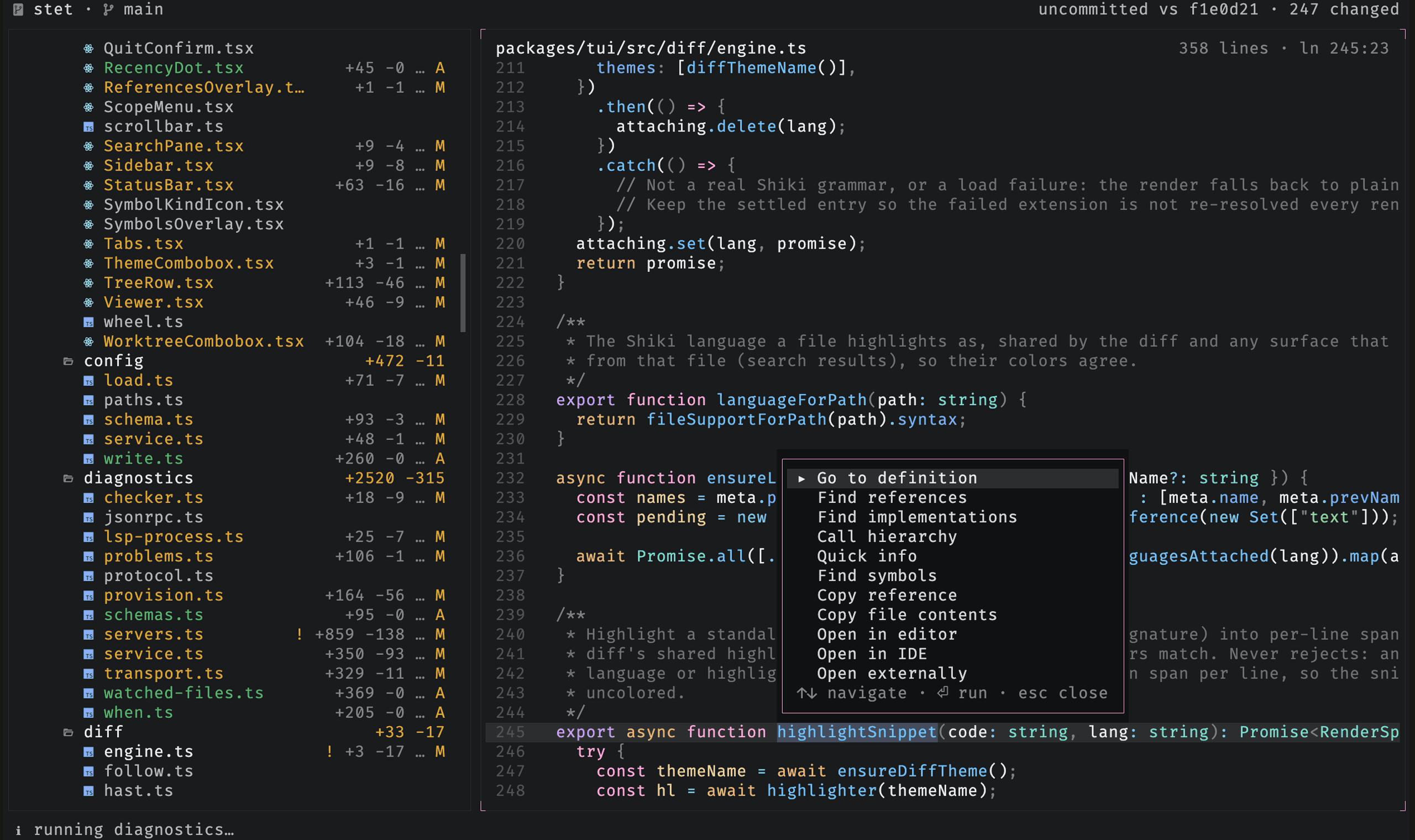
The menu carries whatever applies where you opened it, so it is shorter elsewhere: the code intelligence rows above need a symbol under the caret, and a directory in the tree offers only Copy path. Nothing in it is shown greyed out.
Drag across diff lines to select a range. Holding the pointer at the top or
bottom edge scrolls the viewer and continues the selection. Shift-click extends
the range when the terminal forwards Shift+mouse; some terminals reserve that
gesture for native text selection, so drag or Shift+↑ / Shift+↓ is portable.